
What Are Managed IT Services and Why You Need Them?
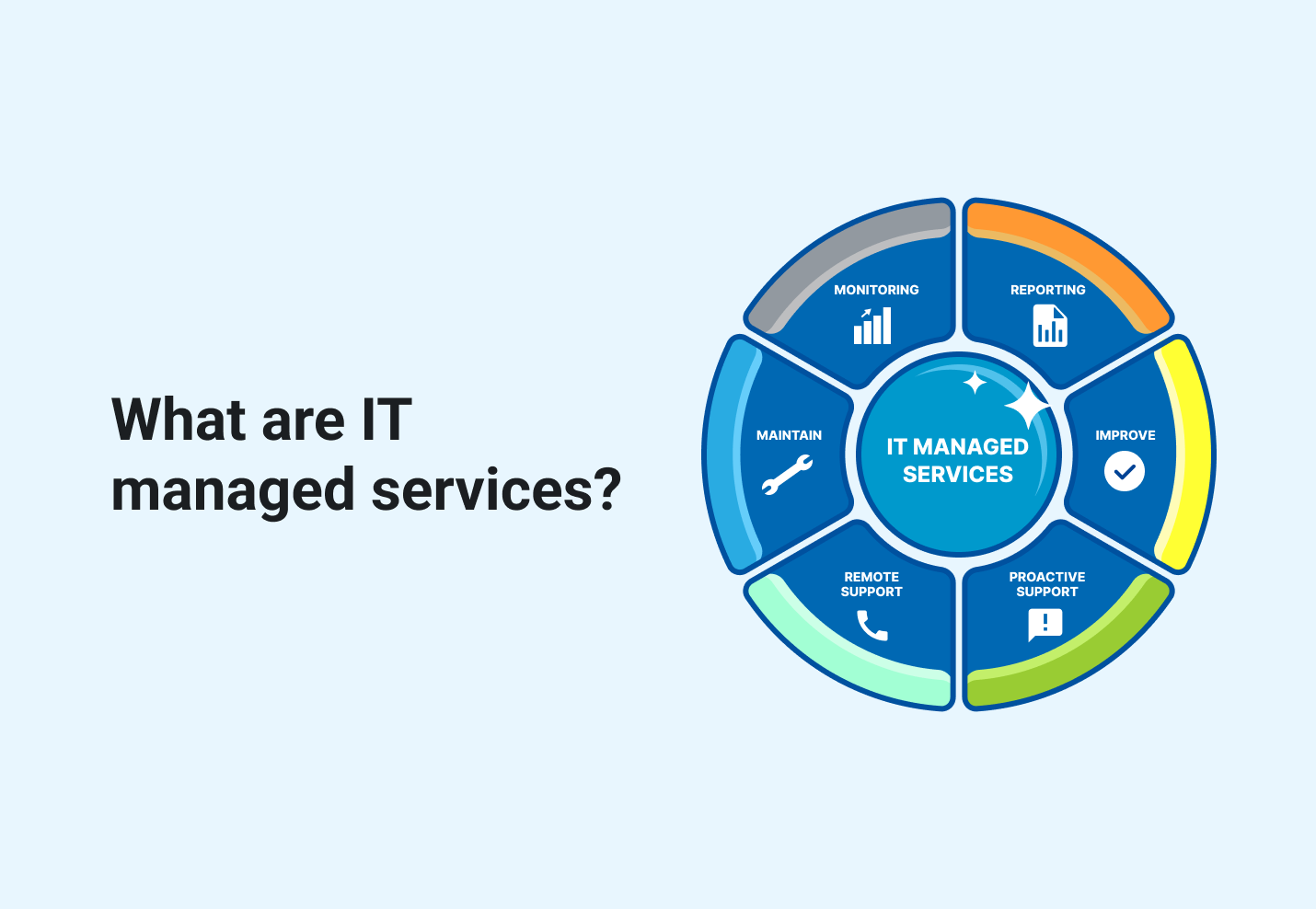
Managed IT services means paying a third-party provider — a managed service provider (MSP) — a recurring fee to run some or all of your IT operations under an SLA: monitoring, helpdesk, patching, security and backup. It replaces break/fix callouts and part of an in-house team with proactive maintenance and a predictable monthly cost. Below: what a contract includes, the benefits, the drawbacks and how to choose a provider.
What are Managed IT Services?
Managed IT services refer to the practice of outsourcing specific IT functions to a third-party provider, known as a Managed Service Provider (MSP). This approach allows businesses to offload various IT tasks and responsibilities, enabling them to focus on core business operations while benefiting from expert technology management.
What is a Managed Service Provider (MSP)?
A managed service provider (MSP) is an outsourced entity that delivers a range of IT and business services to organizations on a continuous, remote basis. MSPs manage various aspects of a company's operations, including IT infrastructure, security, networking, applications, and even non-IT functions like payroll and HR. With specialized expertise and current technology, MSPs enable businesses to focus on core competencies while benefiting from improved operational efficiency and cost-effectiveness. MSPs typically operate on a subscription-based model, offering predictable costs and scalable solutions tailored to meet specific business needs.
Key aspects of managed IT services include:
- Comprehensive IT support: MSPs offer a wide range of services, including remote monitoring and management of servers, desktops, and mobile devices; software installations and updates; and implementing business continuity and disaster recovery protocols.
- Proactive maintenance: Unlike the traditional break/fix model, modern MSPs take a proactive approach to IT management, identifying and addressing potential issues before they become problems.
- Scalability: Managed IT services allow businesses to scale their IT resources up or down based on their needs, without the high upfront costs associated with building in-house IT infrastructure.
- Predictable pricing: Most managed IT services operate on a subscription-based model, typically with monthly fees. This provides businesses with predictable IT expenses and helps with budgeting.
- Access to expertise: MSPs employ teams of skilled IT professionals, giving businesses access to a broader range of expertise than they might be able to maintain in-house.
- Enhanced security: Many MSPs offer managed security services, helping businesses protect their networks, endpoints, and data from cyber threats.
- Compliance support: MSPs can assist organizations in meeting regulatory requirements related to data security and management.
- Cloud services integration: As cloud computing becomes more prevalent, many MSPs now offer services related to cloud migration, management, and optimization.
- 24/7 support: Most MSPs provide round-the-clock monitoring and support, ensuring that IT issues can be addressed promptly, regardless of when they occur.
- Service Level Agreements (SLAs): Managed IT services are typically governed by SLAs, which define the scope of services, response times, and performance metrics, ensuring clear expectations and accountability.
With managed IT services, businesses can benefit from improved operational efficiency, reduced IT costs, and access to advanced technologies and expertise that might otherwise be out of reach. This model is particularly beneficial for small to medium-sized businesses that may not have the resources to maintain a full-scale in-house IT department.
What Types of Managed Services exist?
Managed IT services encompass a wide range of offerings designed to support various aspects of an organization's technology infrastructure. Here are some of the key types of managed IT services available:
- Managed Networks and Infrastructure: Includes establishing and managing LANs, WAPs, firewalls, and load balancing services.
- Managed Security: Covers threat detection, vulnerability assessments, anti-malware solutions, and incident response.
- Managed Support Services: Provides IT helpdesk support, troubleshooting, and issue resolution.
- Managed Cloud Infrastructure: Offers cloud migration, management, and optimization services.
- Managed Print Services: Helps optimize document output and file management.
- End User Services: Focuses on IT support channels for employees and customers.
- Data Backup and Disaster Recovery: Ensures data preservation and swift restoration in case of loss or disasters.
- Managed Endpoint Security: Protects devices like desktops, laptops, and smartphones from cyber threats.
- Data Analytics: Provides business intelligence to identify patterns and improve performance.
- Managed Communication Services: Offers VoIP, data, and video communication infrastructure.
These services can be tailored to meet specific business needs, allowing organizations to focus on core operations while benefiting from expert IT management.
What are the Key Benefits of Managed IT Services?
Managed IT services offer numerous advantages for businesses of all sizes. Here are some key benefits of partnering with a managed service provider (MSP):
Cost savings and predictable expenses
MSPs often operate on a fixed monthly fee, reducing unexpected IT costs and allowing for better budget planning.
Access to expert knowledge
Businesses gain access to a team of IT professionals with diverse skills and certifications.
Improved security and data protection
MSPs implement robust cybersecurity measures and proactive monitoring to safeguard business data.
Increased efficiency and productivity
By handling IT tasks, MSPs allow businesses to focus on core competencies.
Scalability
MSPs can easily adjust services to accommodate business growth or changing needs.
Proactive maintenance
Issues are often identified and resolved before they cause significant problems.
24/7 support
Many MSPs offer round-the-clock monitoring and assistance.
Enhanced compliance
MSPs help businesses meet industry regulations and standards.
Access to latest technologies
MSPs typically invest in current tools and technologies, benefiting their clients.
Faster response times
SLAs ensure quick resolution of IT issues, minimizing downtime.
With these benefits, businesses can improve their IT infrastructure, reduce risks, and focus on growth and innovation.
What Might be the Managed IT Services Drawbacks?
While managed IT services offer numerous benefits, it's important to consider potential drawbacks as well. Here are some disadvantages of managed IT services:
- Loss of control: Outsourcing IT management means relinquishing some control over your technology infrastructure and decision-making.
- Potential security risks: Sharing sensitive data with a third-party provider may increase vulnerability to data breaches.
- Dependency on the provider: Relying heavily on an MSP can lead to operational disruptions if the provider faces issues.
- Limited customization: Some MSPs offer standardized solutions that may not fully align with specific business needs.
- Hidden costs: Additional services or unexpected issues may lead to extra charges beyond the agreed-upon fee structure.
- Communication challenges: Working with an external team can sometimes lead to miscommunication or delays in issue resolution.
- Transition difficulties: Switching to managed IT services or changing providers can be complex and potentially disruptive.
- Service quality concerns: The level of service may not always meet expectations, especially if the MSP is handling multiple clients.
- Compliance issues: In highly regulated industries, ensuring an MSP meets all necessary compliance standards can be challenging.
- Long-term contracts: Some MSPs require lengthy commitments, which may limit flexibility for businesses.
Despite these potential drawbacks, many businesses find that the benefits of managed IT services outweigh the disadvantages. Careful provider selection and clear communication can help mitigate these risks.
What to Look for in a MSP Selection?
When selecting a Managed Service Provider (MSP), it's crucial to consider several key factors to ensure you choose the right partner for your business. Here are the essential features to look for in an MSP:
- Advanced security capabilities, including real-time monitoring and threat detection
- Flexible billing options that align with your business needs and usage
- Comprehensive reporting tools for data-driven decision-making
- Deployment flexibility to adapt to various client environments
- Multi-tenant architecture for efficient management of multiple clients
- Robust data segregation to ensure client information privacy
- Customization options for branding and self-service portals
- Integration capabilities with various tools and platforms
- Remote monitoring and management (RMM) capabilities
- Professional services automation (PSA) for streamlined operations
- Backup and disaster recovery solutions to ensure business continuity
- 24/7 support and proactive maintenance services
By prioritizing these features, businesses can select an MSP that not only meets their current IT needs but also supports future growth and technological advancements.
Why Would You Need Managed IT Services?
Managed IT services offer numerous benefits that can address various business challenges and improve overall operational efficiency. Here are key reasons why organizations might need to use managed IT services:
- Cost-effectiveness: Managed IT services can reduce IT expenses through predictable monthly costs and eliminating the need for in-house IT staff.
- Access to expertise: Businesses gain access to a team of skilled IT professionals with diverse expertise, without the need to hire and train in-house staff.
- Enhanced security: Managed IT services provide advanced security protocols to protect against cyber threats and data breaches, which cost organizations a global average of USD 4.99 million per breach, according to IBM's Cost of a Data Breach Report 2026.
- Improved operational efficiency: By outsourcing IT management, businesses can focus on core activities while IT experts handle technology concerns, leading to increased productivity.
- Scalability: Managed IT services can easily adapt to changing business needs and growth, providing flexible solutions as required.
- Proactive maintenance: Issues are often identified and resolved before they cause significant problems, minimizing downtime and disruptions.
- Regulatory compliance: Managed service providers (MSPs) help ensure adherence to industry-specific regulations and standards, reducing compliance risks.
- Business continuity: Disaster recovery solutions and 24/7 support help maintain operations during unforeseen events.
- Access to latest technology: MSPs provide access to current tools without significant upfront investments.
With these benefits, businesses can improve their IT infrastructure, reduce risks, and focus on growth and innovation while leaving complex IT management to experts.
What Is Included in Managed IT Services?
A typical managed IT contract covers the day-to-day running of your IT estate, under an SLA:
- Remote monitoring and management (RMM) of servers, laptops and network
- Helpdesk with SLA response tiers
- Patching and updates
- Endpoint security
- Backup with tested recovery
- Network and firewall administration, plus cloud and Microsoft 365 administration
- Licence and vendor management
- User onboarding and offboarding
- Monthly reporting
Providers usually price this per user or per device per month, or as a flat retainer for a written scope. For the models and the hidden costs, see managed IT services pricing in 2026; to compare against hiring, see in-house IT vs managed IT: a cost analysis.
What a managed IT contract usually leaves out: migrations and other projects, which are quoted separately; building or integrating business systems; process automation; software development; and IT strategy.
Unlocking Tech is not an MSP — we don't run helpdesks or networks. We work on the part the contract leaves out: integrating systems, automating operational work and building software.
Talk with us for a free consultation.
Solving the same problem on the software side
Managed IT keeps the estate running. If what you're actually trying to cut is repetitive operational work — tickets, data entry, document handling — that problem is usually solved in software, not in support contracts. Where we work:
| If the problem is | What actually fixes it | |
|---|---|---|
| Repetitive back-office work that needs IT automation | Process automation and AI agents wired into your existing systems | Read→ |
| Tools that don't talk to each other | Integration work across CRM, ERP and internal APIs | Read→ |
| Customer support tickets answered by hand | AI customer service agents that resolve routine tickets in your helpdesk and hand the rest to a person | Read→ |
| Not enough engineers | Staff augmentation with senior nearshore engineers | Read→ |
Frequently asked questions
01What is included in managed IT services?+
Usually monitoring and management of servers, laptops and network, a helpdesk with SLA response times, patching, endpoint security, backup with tested recovery, cloud and Microsoft 365 administration, licence management, user onboarding and offboarding, and a monthly report. Projects such as migrations are usually quoted separately.
02What is the difference between managed IT and break/fix?+
Break/fix means you pay someone after something fails. Managed IT means a provider is paid a recurring fee to prevent failures and respond within an agreed time, so cost is predictable and problems are caught earlier.
03When does a business need managed IT services?+
Usually when IT depends on one person, when incidents are only handled after they hurt, or when security and compliance requirements outgrow what the team can cover. Below roughly 75–100 employees, a managed provider is usually cheaper than building the same coverage in-house once salaries, tooling and turnover are counted.
04What does managed IT not cover?+
Building or integrating business systems, automating operational work and developing software are usually outside a managed IT contract. Unlocking Tech is not an MSP; that is the part we work on.